Your Complete Guide to Digital Literacy in the Modern World
In 2026, knowing how to use a computer is no longer a luxury — it is a basic life skill, as essential as reading and writing. From students applying to colleges online, to job seekers sending their first resume, to senior citizens managing their bank accounts digitally — computer literacy touches every corner of our daily lives. Whether you are just starting out or looking to fill the gaps in your knowledge, this guide walks you through the 10 most important computer skills everyone should master.
1. Understanding Computer Fundamentals
Every journey begins with a single step, and in computing, that step is understanding what a computer actually is and how it works. A computer is an electronic device that processes data to produce meaningful results. They come in several forms — desktop computers designed for stationary use, laptops for portability, and tablets for touch-based interaction on the go.
At the heart of every computer are three core components: the CPU (Central Processing Unit), which acts as the brain; RAM (Random Access Memory), which handles temporary data while you work; and storage (hard drive or SSD), which holds your files permanently. Understanding input devices like keyboards and mice, and output devices like monitors and printers, helps you interact effectively with any system. Knowing how to safely power your computer on and off prevents data loss and protects your hardware.
2. Operating System Basics (Windows)
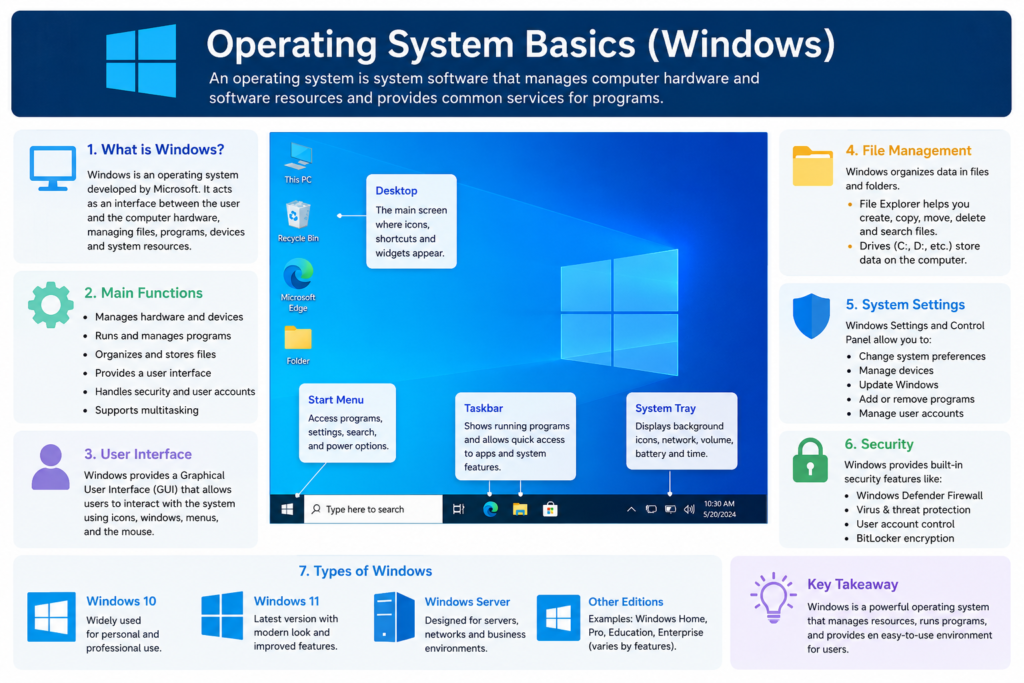
The operating system (OS) is the software that manages all other programs on your computer. Windows remains the most widely used OS in homes, schools, and offices across India and the world. Learning to navigate the desktop, taskbar, and Start menu gives you control over your digital environment.
Key skills include creating and organizing folders to keep your files tidy, installing and uninstalling applications safely, capturing screenshots to document information, and adjusting system settings for comfort and efficiency. These may seem small, but they form the backbone of confident, independent computer use.
3. Typing and Keyboard Shortcuts
Speed and accuracy in typing can save you hours of work each week. Beyond just typing, mastering keyboard shortcuts dramatically boosts your productivity. The most essential ones include:
- Ctrl + C / V / X — Copy, Paste, and Cut
- Ctrl + S — Save your work instantly
- Ctrl + Z — Undo a mistake
- Alt + Tab — Switch between open applications
- Windows + E — Open File Explorer quickly
Shortcuts become second nature with practice and can make your workflow feel effortless.
4. Internet and Browser Skills
The internet is the single greatest learning and working tool available to humanity. Knowing how to use it effectively is non-negotiable. This means going beyond casual browsing — learning to search Google with precision (using quotes for exact phrases, or adding a site name to your query), managing browser tabs, and bookmarking resources for quick access.
Equally important is understanding safe browsing — recognising HTTPS websites, avoiding suspicious pop-ups, and knowing not to click on unknown links. The ability to confidently upload and download files ties directly into every other digital skill you develop.
5. Email and Online Communication
Professional communication has moved almost entirely online. Creating and managing an email account is one of the most foundational digital skills. Beyond that, knowing how to write a clear, polite professional email — with a proper subject line, greeting, and signature — sets you apart in any workplace.
Attaching documents to emails, using CC and BCC correctly, and organising your inbox into folders are skills that every professional needs. And with remote work becoming the norm, fluency with video meeting tools like Zoom, Google Meet, and Microsoft Teams is now as important as attending a physical meeting.
6. Microsoft Word — Document Skills
Whether you are writing a school assignment, a job application, or a business letter, Microsoft Word is the tool of choice. Basic skills include formatting text with bold, italics, and different font sizes; using headings and bullet points to organise content; and inserting images and tables to enrich documents.
One especially useful skill is saving documents as PDFs — a format that preserves layout across all devices and is widely accepted by employers, colleges, and government portals. Creating a professional resume in Word is something every job seeker needs to know.
7. Microsoft Excel Basics
Excel is arguably the most powerful tool in the professional world for non-programmers. It is used for everything from household budgets to managing stock inventories to analysing business data. Start with the fundamentals: creating tables and lists, entering data cleanly, and applying basic formulas like SUM, AVERAGE, MAX, and MIN.
Once you are comfortable with formulas, learn to sort and filter data to find what you need quickly, and create simple bar or pie charts to present information visually. Excel skills are consistently listed among the top requirements in job postings across industries.
8. Digital Payments and Online Safety
India has led the world in digital payment adoption, and in 2026, UPI transactions are woven into everyday life. Understanding how to use UPI apps, net banking, and mobile wallets safely is a critical skill. But with this convenience comes responsibility — cybercrime is rising.
Protect yourself by creating strong, unique passwords for every account, enabling two-factor authentication, and learning to spot phishing scams — fake emails or messages designed to steal your information. Never share OTPs or passwords with anyone, and be cautious of unsolicited calls claiming to be from your bank.
9. Cloud Storage and File Sharing
Cloud storage services like Google Drive, OneDrive, and Dropbox have transformed how we store and share information. Instead of relying solely on a physical hard drive, your files live online — accessible from any device, anywhere in the world. This is particularly powerful for students collaborating on group projects or professionals working remotely.
Key skills include uploading and organising files in Google Drive, sharing documents with specific people (with view or edit permissions), and regularly backing up important data. Cloud storage also means that if your laptop is stolen or breaks down, your files remain safe.
10. Basic Troubleshooting Skills
Technology does not always cooperate, and basic problem-solving skills make you self-reliant. The most important fix in computing — and one that solves an astonishing number of problems — is simply restarting your device. Beyond that, learn to check your internet connection when pages fail to load, run Windows Update to keep your software patched and secure, and periodically clear storage space by deleting old files or emptying the Recycle Bin.
These small habits prevent larger problems and save you the time and expense of calling a technician for issues you can fix yourself in two minutes.
Final Thoughts: Digital Literacy Is the New Literacy
Basic computer skills are no longer optional in 2026 — they are a necessity for education, employment, and everyday life. The good news is that every one of these skills is learnable at any age, with free resources widely available online and in libraries.
You do not need to master everything at once. Start with the fundamentals, practice consistently, and build from there. Each skill you gain opens a new door — to a better job, a more efficient workday, or simply the confidence to navigate the digital world without fear. In the age of information, your computer skills are your passport.
Start today. Your future self will thank you.
— Published 2026 | Digital Literacy Series —