
I still remember the day I had to type a long 2,000-word report in one go. My fingers felt super slow. Every sentence took ages. Does this happen to you too?
Most of us use laptops every day, but we type slowly — like we’re still back in old times. Good news: you don’t need costly classes or special keyboards to type faster. I went from typing 20 words per minute to 65–75 words per minute just by changing small habits. Here’s what really helped me (and it will help you too).
1. First, Check Your Current Speed
Don’t just guess how fast you type — actually measure it. Go to a free website like
GFCA Typing, Monkeytype, 10FastFingers, or Typing.com. Do a 1-minute test. Write down your score and how correct it was (accuracy).
Do this every Sunday morning. This one small habit keeps you real and shows when you are getting better.
2. Fix How You Sit (Yes, It Matters)
Laptop keyboards are flat and low, so many people bend forward a lot. Bad sitting position makes your hands and wrists tired fast → you type slower.
Easy fixes for laptop users:
- Put some books or a cheap laptop stand under your screen so your eyes look straight at the top of the screen (not down).
- Keep your wrists straight (not bent up or down). If your laptop is on your lap or a low table, buy a simple extra keyboard for ₹800–1,200 — it makes a big difference.
- Sit back in your chair with shoulders relaxed instead of leaning forward.
Do this and your hands will feel much lighter even after typing for 30 minutes.
3. Learn Proper Touch Typing (This Changes Everything)
If you still look at the keys while typing, you are losing a lot of speed (maybe 30–40 words per minute).
The fix is easy: learn the “home row” position.
- Left hand: little finger on A, next finger on S, middle finger on D, pointer finger on F
- Right hand: pointer finger on J, middle finger on K, next finger on L, little finger on ;
- Both thumbs rest on the space bar.
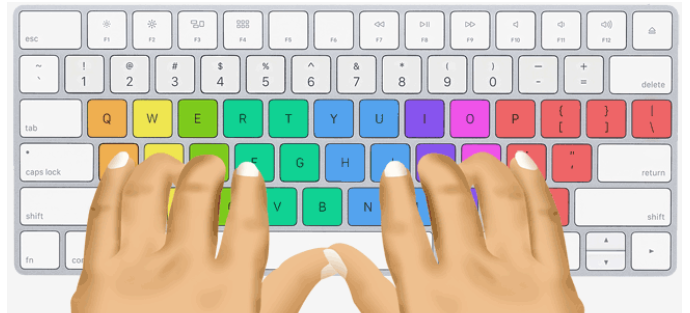
Once your fingers know which keys they own, stop looking at the keyboard. It feels strange for the first week, then it becomes natural and you never look down again.
Free places to practice:
- https://gfca.in/typing/ (it is good for both beginner and Advanced Typers Who want to increase their Typing Speed)
- Keybr.com (my top pick — it only shows the keys you get wrong)
- TypingClub (great for total beginners)
- Monkeytype (fun with quotes, stories, or even code)
4. Practice Smart (Not Just Any Typing)
Typing random messages on WhatsApp won’t make you much faster. Practice with focus instead.
My daily 30-minute routine (shorter than scrolling your phone):
- 10 minute practice on https://gfca.in/typing/ for better finger placement.
- 5 minutes warm-up on Keybr
- 10 minutes on Monkeytype (care about being correct first — speed comes after)
- 5 minutes typing real things (emails, notes, blog posts) while keeping the same smooth flow
My rule: Never type wrong just to go faster. If you make more than 5 mistakes in 100 words, slow down until you get almost everything right. Speed will grow on its own when you type correctly.
5. Stop These Three Bad Habits Right Now
- Looking at the keyboard — cover the keys with paper for one week if needed.
- Using the same finger for many keys (especially pointer fingers doing too much work).
- Hitting backspace a lot. Train yourself to type slowly and correctly the first time.
6. Use Keyboard Shortcuts Like a Pro
Every shortcut saves time. Learn these in one evening:
Ctrl + C / V / X (copy, paste, cut)
Ctrl + Z (undo last action)
Ctrl + Shift + Arrow keys (select whole words fast)
Ctrl + Backspace (delete one full word at once)
Alt + Tab (switch between open windows)
On Windows:
Win + . opens emoji,
Win + V shows copy-paste history.
On Mac:
Cmd + Space opens search,
Cmd + Shift + 4 takes screenshots.
Once you do these without thinking, it feels like you type 20% faster even if your word-per-minute number stays the same.
7. Small Tricks That Work Great on Laptops
- Turn off “Filter Keys” and “Sticky Keys” in your laptop settings — they make typing slower.
- On some new laptops, turn on “fast” keyboard mode in settings (check Lenovo, Dell, HP options).
- Use an extra mouse so your hand doesn’t keep moving to the trackpad.
- Keep the keyboard clean. Dust and small bits of food slow down the keys.
8. Try This 30-Day Challenge
Here’s the simple plan I tell my friends:
Week 1: Learn home row + fix sitting position (aim for 25–35 words per minute)
Week 2: Do 15 minutes practice every day (try to reach 30–40 words per minute)
Week 3: Focus on being correct + learn shortcuts
Week 4: Type your real work every day and check speed once a week
If you actually follow this for 30 days, you will be surprised how much faster you get.
Final Thought
Typing faster is not about being born talented. It’s about fixing small habits and practising regularly. Some days I still drop to 70 words per minute when I’m tired — that’s normal. The real goal is to finish work quicker so you have more time for things you love.
So right now:
- Close this page
- Open https://gfca.in/typing/
- Do one quick test
Then come back and tell me your starting score in the comments. I read them all.
Let’s make those fingers move fast!